

An SSH terminal, right in your browser
Every automation platform eventually meets the same moment. A task fails on one node out of three hundred, the log says No space left on device, and you just want to look. So you go hunting: which IP was that again, where is the key, is the VPN up, why is my laptop complaining about known_hosts. Five minutes later, you finally type df -h.
CTFreak 1.42.0 shortens that trip to a single click. SSH nodes now have a Terminal button that opens an interactive shell right in your browser.
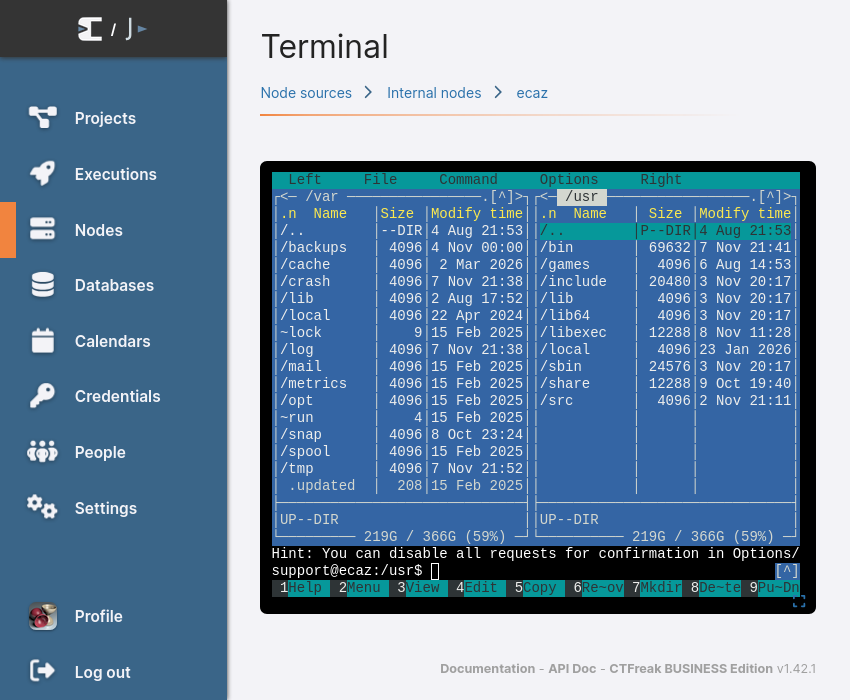
From failed execution to shell prompt
The button sits next to each node, on the node page as well as in the node list of a node source. Click it, and CTFreak connects with the credential the node already uses for its executions. Nothing to copy to your workstation, nothing to look up.
It fits the moments where automation needs a human for a minute:
- Investigating a failure: check the disk, read a log, see whether the service is actually running before you rerun the task.
- Trying before scheduling: run a command by hand on the target before turning it into a task, so the first scheduled run is not also the first test.
- Quick fixes: restart a stuck service, remove a stale lock file, delete the 40 GB core dump nobody asked for.
A real terminal, not a command box
This is full terminal emulation: colors, mouse support, and a size that follows your browser window. htop, vim, less and tmux behave just as they do in your usual terminal. And when the session deserves your whole screen, a fullscreen toggle waits in the lower right corner, as in code editors.
Guardrails included
An interactive shell on your servers is a powerful thing to hand out. Terminals are reserved to administrators and closed automatically once idle, so a laptop lid shut on a Friday evening doesn’t leave a root shell open until Monday.
The right tool for the job
The terminal is designed for short interactive sessions. For anything long, a database migration or a three-hour backup, use a command or bash script task instead: it keeps running regardless of your browser, logs its output, and doesn’t care how your Wi-Fi is feeling today.
Getting started
Upgrade to 1.42.0, open any SSH node and click Terminal. The documentation covers the details, from session closing rules to SSH connection limits.
NB: The SSH terminal is available in all CTFreak editions. With the FREE Edition, sessions are closed after 1 minute.